




What’s the difference between Market and Aggressive gas settings


Market and Aggressive gas price settings let users control transaction speed and cost when swapping tokens.
When performing swaps on Ethereum or other EVM-compatible networks, the gas cost determines how fast a transaction will be confirmed. Gas represents the cost of using network resources: paying more usually means faster processing, while lower fees may take longer.
How gas prices are formed
On Ethereum and most EVM-compatible chains, the total transaction fee equals the gas used multiplied by the effective gas cost. This cost is determined when the transaction is included in a block and consists of two parts: the base fee, which fluctuates with network congestion and is burned, and the priority fee, or tip, paid to validators to encourage faster inclusion. The max fee defines the upper limit of what can be spent, and any unused difference between the max fee and the actual cost is automatically refunded.
Faster confirmation generally depends on setting a competitive priority fee and a max fee high enough to cover both the base and priority fees at the time the block is produced.
Gas settings on 1inch
All gas-related settings can be managed directly in the Pro interface of the 1inch dApp. Here, users have two options for gas strategy: Market and Aggressive. These determine how much they are willing to pay for the transaction to be processed and how quickly it will be confirmed.
Market gas price
The Market option reflects the current average gas price at the moment of execution. It is the rate used by most transactions and typically provides a balance between speed and cost.
Aggressive gas price
The Aggressive option applies a higher gas price, giving the transaction priority in the network queue. It is useful when quick confirmation is needed, for example during periods of heavy network activity or fast price changes.
In short:
- Market provides a standard gas price for balanced efficiency
- Aggressive offers faster execution at a higher cost
How to use gas settings on 1inch
In 1inch Pro, users can adjust gas preferences before confirming a swap. These gas settings apply to Market swaps, which use the 1inch Aggregation Protocol to find optimal routes across decentralized exchanges, ensuring efficient pricing, low slippage and secure execution.

- Go to 1inch.com/pro and connect a wallet.
- Switch to the Market tab.
- Select the token pair to swap.
- Enter the desired amount.
- For buying, enter the total tokens to receive.
- For selling, enter the amount to swap.
- Choose the preferred gas fee strategy (Market or Aggressive).
- Review the details, approve if needed, and confirm the swap.
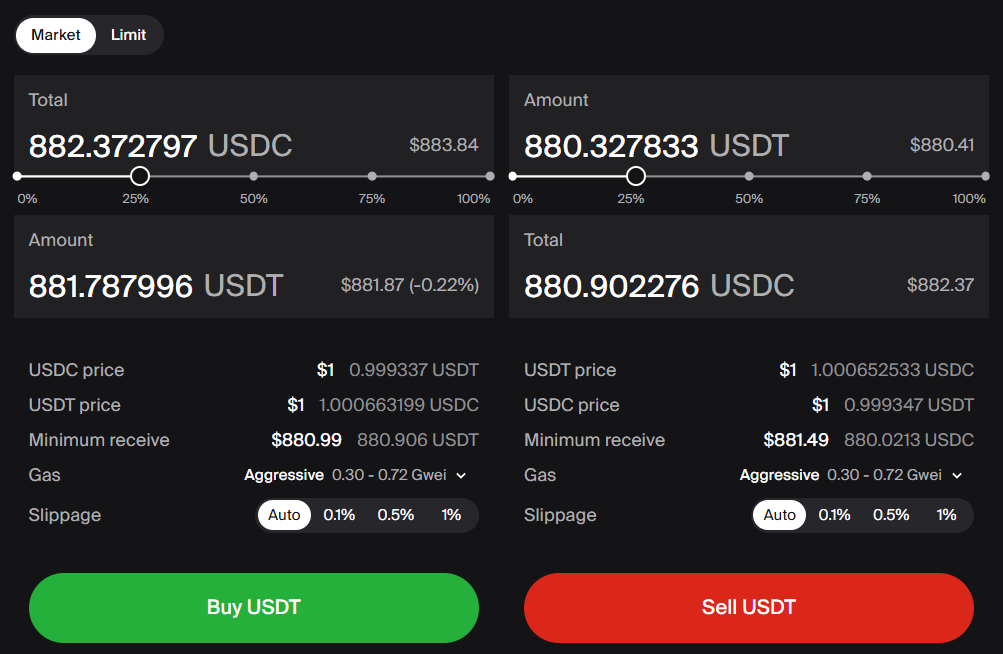
For users who prefer not to adjust gas settings manually, 1inch also offers gasless swaps in the Swap interface, including cross-chain swaps, which operate without bridges.
For those seeking more control, 1inch Pro provides detailed customization of gas settings and other parameters for an advanced, flexible experience.
Stay tuned for more guidance as we continue answering key questions about 1inch and Web3!
Share the article


 Copy done!
Recent Posts

How AI agents execute on-chain trades: from intent to execution
AI agents are turning DeFi trading into a one-step process: define your goal, and let the system handle the rest. Here’s how they move from intent to on-chain execution.
How joint efforts unlocked over $100 mln stuck on Aave
DeFi works best when projects pull together. Several protocols stepped in and built an emergency exit after the recent Aave situation.

AI agents vs trading bots: what’s the difference, and which works better?
AI agents and trading bots automate DeFi trading in different ways. Learn how they compare, where each performs better and why hybrid strategies are emerging as the most effective approach.
