




How to set limit orders on 1inch

In this post, we’ll explain why you need limit orders and how to make the most of 1inch’s limit order swap functionality.
You want to make a crypto swap. But the market price isn’t what you expect. What do you do? Constantly monitor prices? Chase charts?
No need. Just place a limit order. It lets you choose your target price, set your terms, then step away. The swap only happens if the market reaches your price. You stay in control, without watching charts or reacting to every fluctuation.
With a limit order, you can:
- reduce exposure to price volatility.
- sell at your target price
- buy dips without sitting in front of the screen
Why use 1inch Limit Orders to swap tokens?
With 1inch Limit Orders, you keep control of your trades without giving up custody of your funds. You set the parameters. The protocol executes your parameters.
Unlike on centralized exchanges, there’s no need to deposit your assets or trust a third party to hold them. Your funds stay in your wallet, and the order is executed only under the conditions you’ve defined. This reduces counterparty and custody risk.
Meanwhile, 1inch’s aggregation and execution logic helps ensure efficient fills. Orders are executed on-chain when the target price is reached, without requiring you to monitor the market or act manually. This way, you can plan trades in advance, avoid last-minute decisions and execute trades even when you're offline.
For active traders, the limit order functionality is a way to automate strategy execution. For users with less time to monitor markets, it’s a way to stay disciplined. In both cases, limit orders give you more control over when and how your trades execute.
Placing a limit order on 1inch: a step-by-step guide
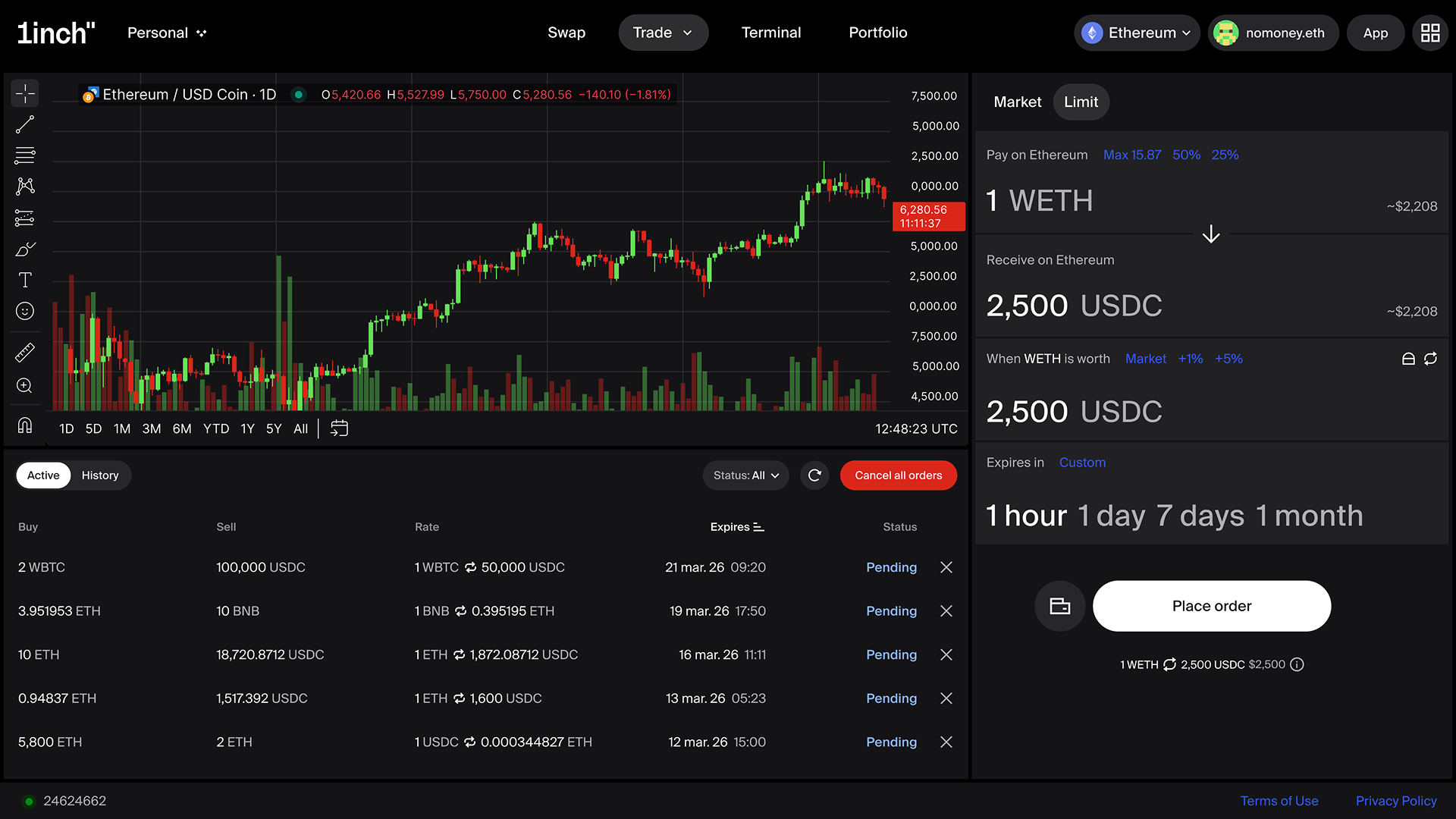
On 1inch, you can place a limit order in Trade mode. Go to 1inch.com In the upper menu, select Trade and in the dropdown menu select Limit. You’ll be taken to the limit order swap form.
Now, follow these steps.
Connecting the wallet
Click “Connect wallet.” 1inch currently supports a wide range of mobile DeFi wallets and connection options, including 1inch Wallet, Ledger Wallet, Binance Wallet, Wallet Connect, Trust Wallet, OKX Wallet, Crypto.com Wallet, Bitget Wallet and Coinbase Wallet. Select your wallet, scan a QR code, confirm the connection in your wallet app.
Selecting chains and tokens
Select the tokens you want to swap and receive, as well as the networks. 1inch supports numerous tokens and major blockchain networks, including Ethereum, BNB Chain and Base. In the candlestick chart to the left of the swap form, you’ll be able to see the performance of the selected token pair over a chosen time period.
Selecting the price
Select the price at which you want to swap your token. You can use the presets Spot, +1%, +5% or set your own price.
Selecting the expiry period
The presets include 1 hour, 1 day, 7 days and 1 month, but you can also define your own expiry period.
Finalizing the swap
Click “Swap.” You’ll be prompted to confirm the order in your connected wallet app. Check the data to make sure it is correct. Sign the order. Your order will execute if/when the market reaches your target price.
If your chosen price is not reached during the expiry period, your order will be automatically cancelled. You pay nothing for orders that don't fill.
For 1inch news and updates subscribe to our newsletter.
Share the article


 Copy done!
Recent Posts

1inch launches a US DeFi education campaign
1inch is launching 1inch Forward, a US education campaign designed to close that gap. It starts with an open letter to educators and continues with a campus tour across top universities.

1inch heads to major US crypto events
In the United States, 1inch is joining the conversations which will map the next era in DeFi.
How to swap tokens on 1inch: a step-by-step guide
On 1inch, you can swap tokens at the best rates across multiple networks. In this post, we’ll guide you through the process, explaining all the details.
